

Abusing VSCode: From Malicious Extensions to Stolen Credentials (Part 2)

- High Level Architecture
- VSCode API
- Electron safeStorage
- Chromium OSCrypt
- Analysis
- Limited Documentation
- No Sandboxing
- Hardcoded Chromium Password
73% of developers use VSCode (opens in a new tab) to work on hobby projects and enterprise software alike. At the same time, a disproportional amount of independent security research has been performed on VSCode to enable the community to make informed, risk-based decisions when it comes to VSCode adoption and hardening. Both Check Point (opens in a new tab) and Aqua (opens in a new tab) show how easily malicious extensions steal personal identifiable information (PII) and other sensitive data by impersonating popular extensions in the VSCode Marketplace (opens in a new tab). Cycode (opens in a new tab) unveiled that stealing tokens from other extensions, even though protected through VSCode's internal vscode-encrypt rust module, is trivial. Nothing keeps the same extension from sending this critical information off to a nefarious command & control (C2) server either.
Since Cycode published these findings, VSCode migrated away from their internal rust module (opens in a new tab) and instead use Electron (opens in a new tab)'s safeStorage API (opens in a new tab) to enable their SecretStorage API (opens in a new tab). In this blog post we dive deep into the implementations of VSCode, Electron & Chromium, to demonstrate that the same limitations as initially laid out by Cycode still exist today: any malicious extension can steal other extension's credentials, even though they are managed and namespaced by the VSCode SecretStorage API.
High Level Architecture
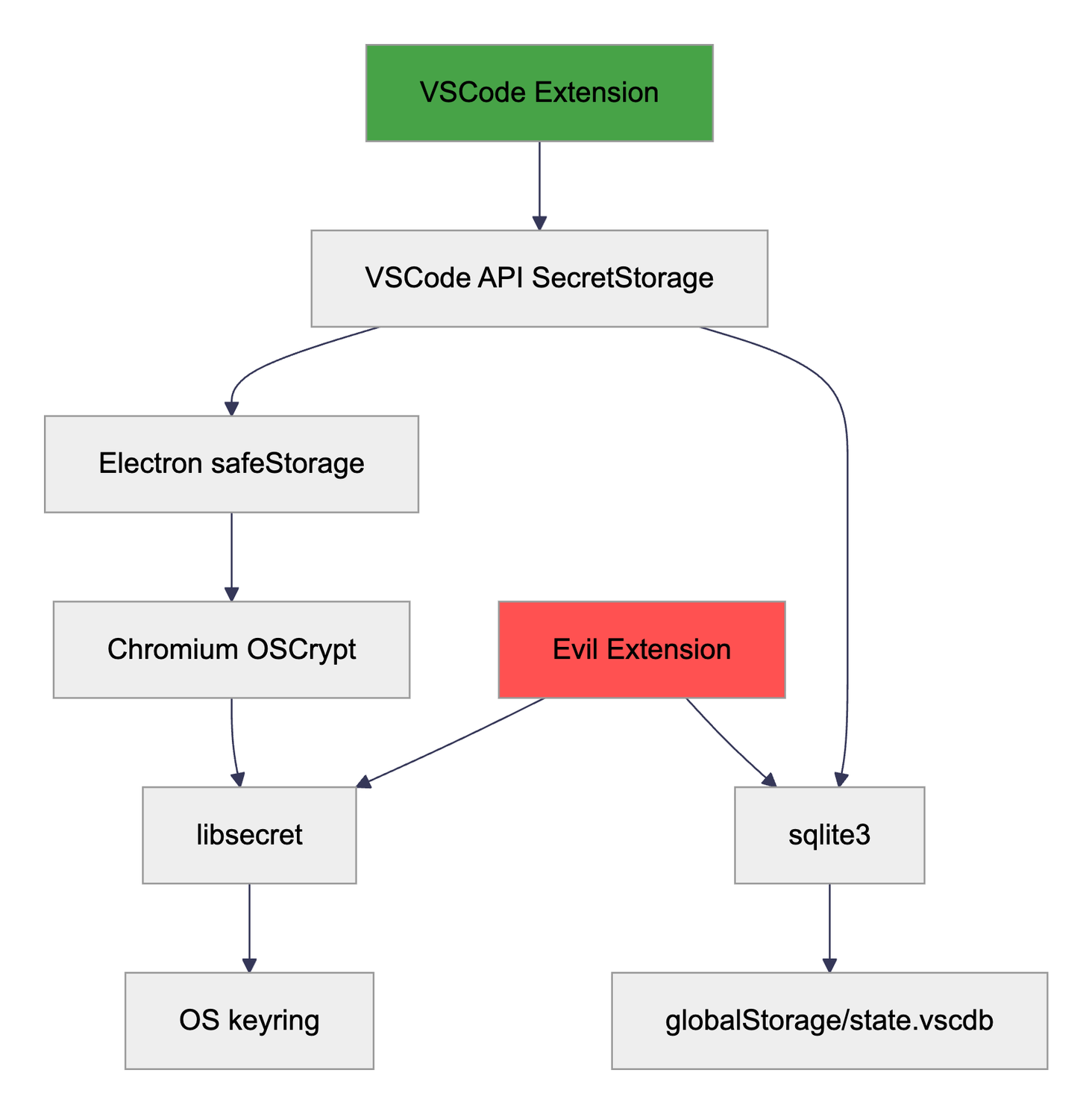
VSCode relies on Electron, a popular open-source framework to create desktop applications using web technologies, which run on any platform. The rendering stack in turn utilizes the Chromium browser engine, which also provides APIs to securely store secrets backed by the operating system. On Linux this functionality is implemented by libsecret (opens in a new tab).
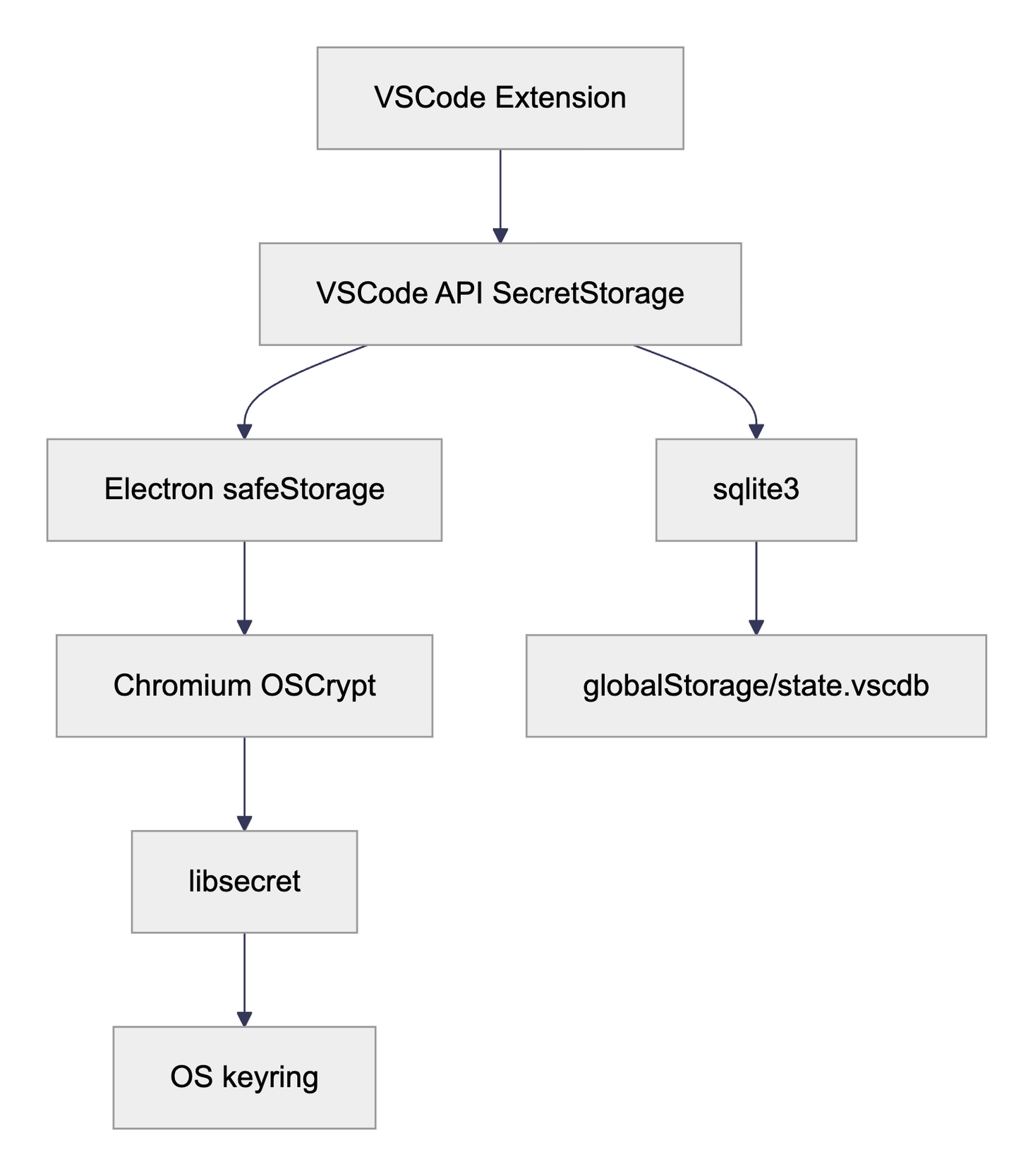
Since libsecret is a Linux specific implementation, some details may be different for MacOS (keychain (opens in a new tab)) and Windows (DPAPI (opens in a new tab)), but the same attack vector should work on any OS.
VSCode API
The VSCode API includes several security-relevant functionalities, most notably the SecretStorage class. It allows extensions to store and retrieve secrets beyond a single session and workspace. Its documentation states that this is a "[storage utility for secrets [and] information that [are] sensitive](https://code.visualstudio.com/api/references/vscode-api#SecretStorage)". It also takes care of persisting the secrets between sessions in a shared SQLite3 database, which also holds the user's configuration and common VSCode settings. It is stored in the user's home directory: ${HOME}/.config/Code/User/globalStorage/state.vscdb.
The database holds a single table, ItemTable, with a very simple layout that features only two columns: key and value.
Secrets always have a key that is prefixed with secret://, followed by a simple JSON object that tracks the ID of the extension for which this secret is stored (this enables namespaced secrets), as well as an arbitrary key which is used by the extension to look up its secrets. A full key value looks like this:
secret://{"extensionId":"my.extension","key":"secret-token"}The value column holds another JSON object that mainly stores the encrypted secret using a byte slice representation:
{"type":"Buffer","data":[118,49,49,79,119,...]}Electron safeStorage
The Electron safeStorage API (opens in a new tab) is a very thin wrapper, only ~100 lines of C++ (opens in a new tab), to call down to the Chromium OSCrypt package. Its API documentation promises to protect "data stored on disk from being accessed by other applications or users with full disk access (opens in a new tab)".
Chromium OSCrypt
This is the library where the actual cryptographic operations are implemented. Let's step through each major operation performed.
Encryption / Decryption
The OSCryptImpl::EncryptString (opens in a new tab) and OSCryptImpl::DecryptString (opens in a new tab) is what is called by the Electron safeStorage API.
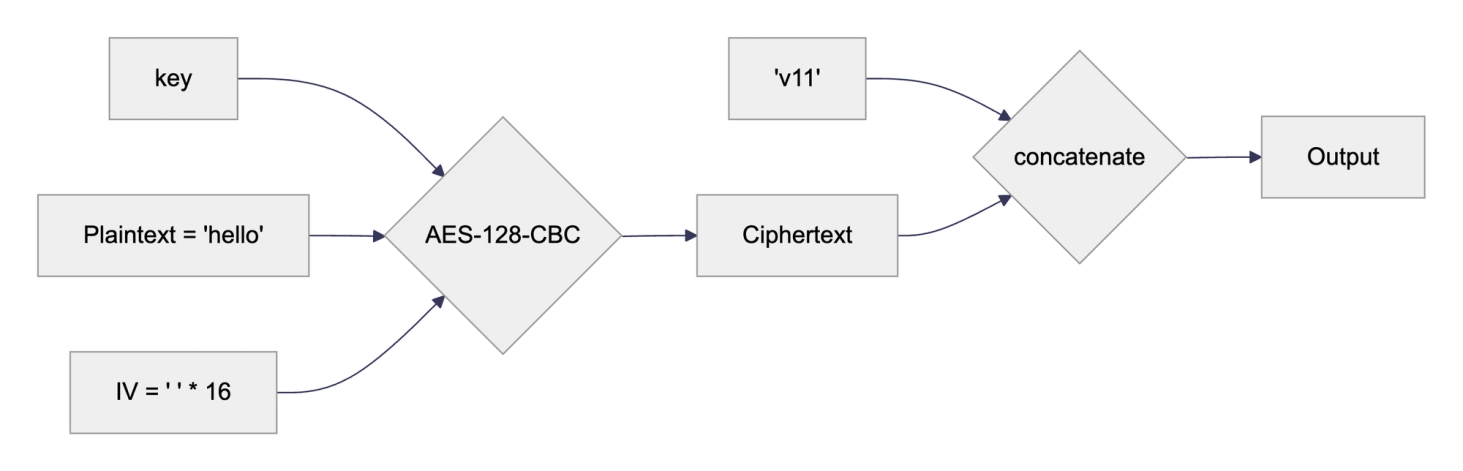
The core encryption (opens in a new tab) mechanism relies on AES-128 in cipher-block-chaining (CBC) mode. The initialization vector (IV) is hard-coded (opens in a new tab) to the string of 16 spaces (0x20 hex). No modifications are made to the user-provided plain text.
Once the cipher-text is produced, a prefix is added. The prefix v11 means encrypted with a randomly generated password. The value v10 means that the hard-coded key peanuts (opens in a new tab) was used to encrypt the string, which is used as a fallback on Linux systems where the keyring or other secure storage is not available.
Key Management
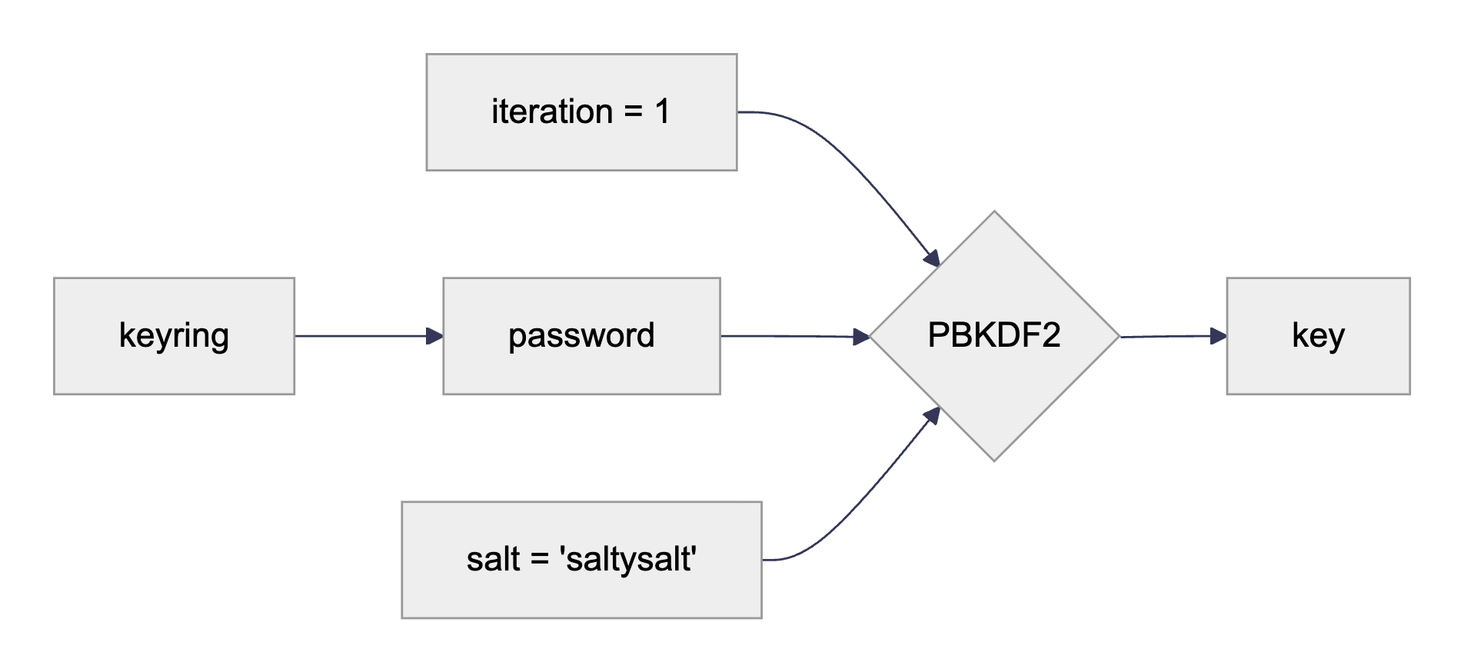
The key is derived from a password, which in turn is stored in the user's local keyring, the implementation of this is backed by libsecret (opens in a new tab). The salt (opens in a new tab) and iteration count (opens in a new tab) are hard-coded.
Key Generation
In case there is not yet a password stored in the keyring for this application a new random password is base64 encoded (opens in a new tab) and stored in the keyring.

Even though the password is base64 encoded, it is never decoded and simply fed as-is into the key derivation function! This may or may not have a been a frustrating culprit when developing the PoC 😉
Analysis
Equipped with this knowledge, we can dive into the problems that arise from the chosen implementations.
Limited Documentation
The attentive reader may have picked up on the changing promises made by the documentation about the capabilities to store secrets. Let's repeat them side by side:
- VSCode SecretStorage API (opens in a new tab): "storage utility for secrets, information that is sensitive" + Electron safeStorage API (opens in a new tab): "This module protects data stored on disk from being accessed by other applications or users with full disk access." + Chromium OSCrypt API (opens in a new tab): "This directory contains OSCrypt implementations that support cryptographic primitives that allow binding data to the OS user." + Libsecret itself provides no documentation about it's security assumptions (opens in a new tab), but a SO post (opens in a new tab) puts it's quite succinctly: "allows a user to store, e.g., passwords in a way that they are easily accessible for the logged on user, but very hard to access by someone else."
Even though there is no evidence to support it, the Electron API claims to keep secrets safe from other applications. Even worse, the VSCode documentation makes no further claims and declares the storage secure for sensitive information.
When API documentation provides too little information about their capabilities and assumptions, developers are put at a disadvantage to make good decisions.
We have started conversations with the VSCode (opens in a new tab) and Electron (opens in a new tab) projects to improve the documentation and enable developers to make informed decisions.
No Sandboxing
As there is no sandboxing implemented in VSCode (opens in a new tab), any extension has the same permissions as any other user process. Extensions are free to read and write files on disk, make network requests, or call other available APIs and libraries.
Therefore, an evil extension is able to directly call out to libsecret and sqlite3 to read encrypted secrets from other extensions and decrypt them using the OS-managed key.
We have released an example extension that does exactly this. (opens in a new tab) It has some built-in safeguards, but when you run the "Steal Secrets" function, it will happily decrypt and print all VSCode-managed secrets from other extensions.
As there is no plan to support extension sandboxing, enterprises need to take on the challenge of discovering, classifying and limiting access to malicious extensions before they can harm their business.
Hardcoded Chromium Password
As Linux is a more fragmented ecosystem than MacOS and Windows, when there is no keyring available, Chromium falls back to using a static password to encrypt secrets. This level of security is equal to not using a password at all, as there is no secret knowledge required to decrypt the stored information. Therefore, even other users on a shared system are able to decrypt data if they get access to an encrypted string.
This opens up new avenues for an attacker. Breaking availability, e.g., via denial of service or misconfiguration, is usually an easier target than breaking state-of-the-art encryption.
This limitation should be communicated more clearly, as the fallback is a silent one.
Disclosure
We followed VSCode's security policy (opens in a new tab) and disclosed our findings to Microsoft using the Microsoft Security Response Center (MSRC).
Microsoft reviewed our findings and concluded that "users should only install extensions they trust" as publicly documented (opens in a new tab).
We will continue our efforts with the VSCode & Electron teams to enable users and developers to make better security decisions in future.
Get in touch
- [email protected]
- London, NYC, Melbourne, Auckland
Related blogs
View allDefusing CanisterWorm: How Bun and Deno Secure the JavaScript Supply Chain
TeamPCP's CanisterWorm is exploiting npm's postinstall hooks. Learn how modern JavaScript runtimes like Bun and Deno neutralise this threat by default.

ControlPlane Launches Enterprise Support For OpenBao To Strengthen Secrets Security
ControlPlane Launches Enterprise Support for OpenBao.

Trust Issues: Navigating Open Source and Software Supply Chain Risk
A two-part journey through the lens of large banks, regulated industries, and security consultancies

Speak to an expert
Engage with world-leading AI and cloud security specialists